L2JMobius

Hello Everyone

Kernel · 8 · 860

Offline Kernel

  • Vassal
  • *
    • Posts: 4
hi all, i'm newbie or a little bit on this topic, if u can help me with, how o where can i get some tool for improve my skills? i appreciate.

from now im basically trying to insert a NPC (GMSHOP) or find some idea to improve and understand how it was programed

testing CT0_Interlude build


Online Mobius

  • Distinguished King
  • *****
    • Posts: 19655
Welcome to L2jMobius!

Here's how to improve your skills.
You literally need zero programming skills.

-Look at existing NPC implementations for a specific NPC id you want to copy it's functionality.
-Shift/Click with an admin on any NPC will show you it's information.
-NPC data is typically in XML files in the data\stats\npcs folder.
-Custom NPC data, that use displayId from existing NPCs, are located at data\stats\npcs\custom.
-Dialog files are in data\html.

You can use the Search tool for fast searching all the project files for anything you look for.
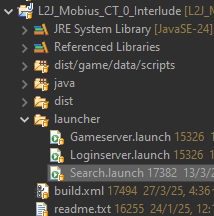

-Create a copy of the original NPC data in a new XML file at data\stats\npcs\custom.
-Make sure you use a new NPC id.
-Do not forget to set the displayId parameter to whatever NPC you want it to look like.
-Copy the html dialogs to the same folder with the original htmls, just rename them to use your new NPC id.

Move on after that, by checking what bypasses the htmls use and maybe create copies of your own.
The Search tool again can be very helpful on finding things.


How to create any custom NPC


Offline Kernel

  • Vassal
  • *
    • Posts: 4
Welcome to L2jMobius!

Here's how to improve your skills.
You literally need zero programming skills.

-Look at existing NPC implementations for a specific NPC id you want to copy it's functionality.
-Shift/Click with an admin on any NPC will show you it's information.
-NPC data is typically in XML files in the data\stats\npcs folder.
-Custom NPC data, that use displayId from existing NPCs, are located at data\stats\npcs\custom.
-Dialog files are in data\html.

You can use the Search tool for fast searching all the project files for anything you look for.


-Create a copy of the original NPC data in a new XML file at data\stats\npcs\custom.
-Make sure you use a new NPC id.
-Do not forget to set the displayId parameter to whatever NPC you want it to look like.
-Copy the html dialogs to the same folder with the original htmls, just rename them to use your new NPC id.

Move on after that, by checking what bypasses the htmls use and maybe create copies of your own.
The Search tool again can be very helpful on finding things.


How to create any custom NPC

very useful search.launch
can u help me with some information about bypasses? how can i use correctly path or something like that.?
exist any documentation?

thx for help. :P


Online Naker

  • Count
  • *****
    • Posts: 450
  • Coding Dreams

Offline Kernel

  • Vassal
  • *
    • Posts: 4
The code is the documentation
where can i start to read it?

im trying to find a way to se server package name or command list, bypasses.
something like this:
Code: [Select]
admin_ , player_help, npc_, manor_menu_select?, bbs_, _bbs, _friend, _mail, _block, Quest,_match, _diary, arenachange or
Code: [Select]
_bbshome, _bbsloc, _bbsclan, _bbsmemo, _bbsmail, _maillist_0_1_0_, _friend, _block, _bbstopics, _bbsposts
pls help me with some refers.


Online Naker

  • Count
  • *****
    • Posts: 450
  • Coding Dreams
Start checking the script folder. \dist\game\data\scripts\handlers there you have the handlers
you can also use search fuction from IDE


Offline Kernel

  • Vassal
  • *
    • Posts: 4
Start checking the script folder. \dist\game\data\scripts\handlers there you have the handlers
you can also use search fuction from IDE
thx this help me a lot !!

do you know where can i find information or list for bypass command ??


Online Mobius

  • Distinguished King
  • *****
    • Posts: 19655
This is the  introduction section, not request.

-topic locked-