Welcome to L2jMobius!
Here's how to improve your skills.
You literally need zero programming skills.
-Look at existing NPC implementations for a specific NPC id you want to copy it's functionality.
-Shift/Click with an admin on any NPC will show you it's information.
-NPC data is typically in XML files in the data\stats\npcs folder.
-Custom NPC data, that use displayId from existing NPCs, are located at data\stats\npcs\custom.
-Dialog files are in data\html.
You can use the Search tool for fast searching all the project files for anything you look for.
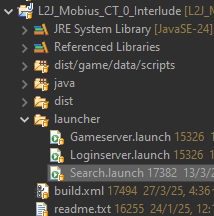
-Create a copy of the original NPC data in a new XML file at data\stats\npcs\custom.
-Make sure you use a new NPC id.
-Do not forget to set the displayId parameter to whatever NPC you want it to look like.
-Copy the html dialogs to the same folder with the original htmls, just rename them to use your new NPC id.
Move on after that, by checking what bypasses the htmls use and maybe create copies of your own.
The Search tool again can be very helpful on finding things.
How to create any custom NPC