Overview:In game, the configuration setting AltGameViewNpc determines whether regular players can view detailed NPC stats by using Shift+Click on an NPC.
By default, this setting is disabled, so only Game Masters (GMs) have this capability.
Configuration Details:Located in the
NPC.ini file, this option is controlled by the following line.
# Allows non-GM players to view NPC stats via shift-click
# Default: False
AltGameViewNpc = False
What It Does:When
AltGameViewNpc is set to
True, all players (not just GMs) can access an NPC's stats by holding down the Shift key and clicking on the NPC.
This brings up a window displaying information like HP, MP, attack, defense, and elemental resistances, providing players with an edge in preparing strategies for encounters.
When this setting is
False, only GMs have access to this detailed stat view.
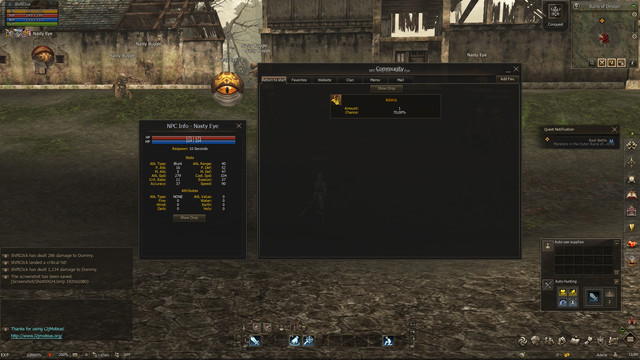
Example in Action:The screenshot below shows an example of the NPC stat view.
In this example, a player has Shift+Clicked on the monster
Nasty Eye and can see detailed stats like attack power, defense values, elemental resistances and item drops.
 How to Enable This Feature for Players:
- Open the NPC.ini configuration file.
- Locate the line: AltGameViewNpc = False
- Change False to True: AltGameViewNpc = True
- Save the file and restart the server for the changes to take effect.
When to Use This Feature:Allowing players to view NPC stats can enhance gameplay by giving them more information about their opponents, making battles more strategic.
However, consider enabling this option carefully, as it may reveal information that could impact the balance of PvE encounters.